You can watch live TV on our website, the ITVX app and some connected TVs.
The channels you can stream are ITV1, ITV2, ITVBe, ITV3 and ITV4, as well as curated channels showing a selection of ITV's best content. You can also watch live events through ITVX, although please note that certain live events may not be available on all devices.
How to watch on the website
Click 'Live' in the navigation bar or select a channel from our homepage.
How to watch on a mobile device
On iOS and Android devices, go to the 'Live’ section of the app and swipe the screen to scroll through the channels.
How to watch on connected TV
The live TV feature is currently available on Amazon Fire TV, Android TV, Apple TV, Freesat, LG Smart TVs, Now/Roku streaming players, Samsung Smart TVs (2017 and above), PlayStation (PS4 and PS5), Sky Q, Sky Glass and Sky Stream puck, Virgin Media (TV360 and Stream), Xbox One/S/X and Xbox Series X/S.
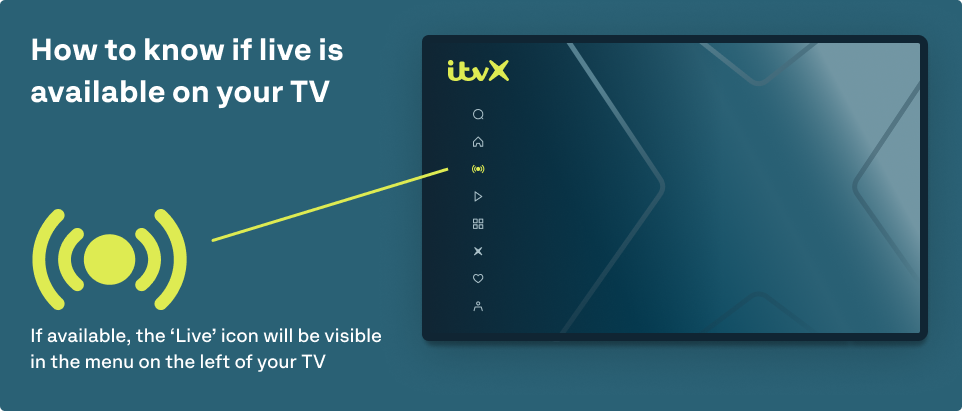
Some Freeview models also support live TV on ITVX. You’ll know if live TV is available on yours if you can see a ‘Live’ icon in the menu on the left hand side of the screen (see image below).
Sometimes a show will only have television rights and not online rights. If this happens you will receive a message saying the programme is unavailable - don’t worry, this isn’t a technical fault.
Was this article helpful?
That’s Great!
Thank you for your feedback
Sorry! We couldn't be helpful
Thank you for your feedback
Feedback sent
We appreciate your effort and will try to fix the article